
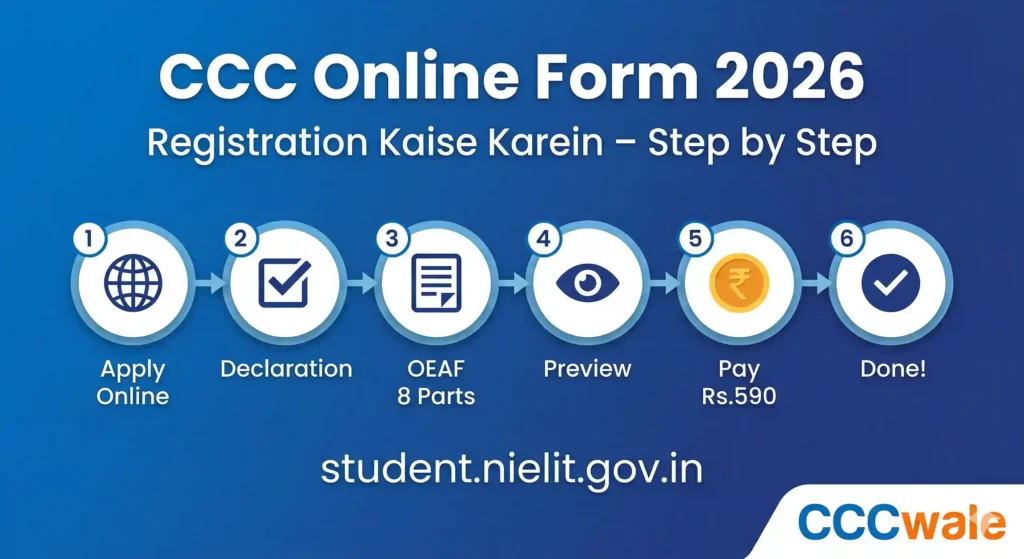
✓ VERIFIED Last verified: April 2026 | Source: NIELIT Official Guide – OEAF Guidelines v1.12 (2024)
Key Takeaways – CCC Registration 2026
- Registration Portal: student.nielit.gov.in → Apply Online → CCC
- Form Name: OEAF (Online Examination Application Form)
- Exam Fee: Rs. 500 (exclusive of taxes/GST) — with GST approx Rs. 590
- Apply Cycle: 2 mahine pehle apply karo — jaise March exam ke liye January mein
- Eligibility: Koi minimum education nahi — koi bhi apply kar sakta hai
- Photo Spec: 3.5cm x 4.5cm, JPEG, 5-50KB, white background, professional
- Signature Spec: 4.5cm x 3.5cm, JPEG, 5-20KB, black/blue ink on white paper
- Payment Options: Online (Net Banking, Debit/Credit Card, UPI), NEFT/RTGS, CSC SPV
- Critical Rule: OEAF submit hone ke baad koi correction nahi hoti — details 3 baar check karo
Is Article Mein Kya-Kya Hai (Table of Contents)
- CCC Registration 2026 – Overview & Monthly Schedule
- Registration Se Pehle Kya Ready Rakhein? (Prerequisites)
- CCC Online Form Kaise Bhare – Step by Step (OEAF Process)
- Photo, Signature & LTI Specifications (NIELIT Official)
- CCC Exam Fee Payment – 3 Options
- Form Submit Ke Baad Kya Hota Hai? (Timeline)
- Common Mistakes & How to Avoid Them
- CCC Chapter Wise Practice Tests
- Disclaimer
- FAQ
CCC Online Form 2026 – Overview & Monthly Schedule
CCC registration puri tarah online hai — aapko student.nielit.gov.in par OEAF (Online Examination Application Form) bharna hota hai. CCC exam har mahine hota hai, aur har mahine ke exam ke liye 2 mahine pehle form bharna hota hai. Matlab agar aap March mein exam dena chahte hain toh January mein form bharna hoga.
Neeche NIELIT ke official guide se verified CCC online form ka monthly schedule diya gaya hai — ye schedule har saal same rehta hai:
| Exam Month | Form Start Date | Form Last Date |
|---|---|---|
| January | November 01 | November 30 |
| February | December 01 | December 31 |
| March | January 01 | January 31 |
| April | February 01 | Feb 28/29 |
| May | March 01 | March 31 |
| June | April 01 | April 30 |
| July | May 01 | May 31 |
| August | June 01 | June 30 |
| September | July 01 | July 31 |
| October | August 01 | August 31 |
| November | September 01 | September 30 |
| December | October 01 | October 31 |
Simple Formula Yaad Rakho
Exam month se 2 mahine pehle ka poora mahina = form filling window. Jaise July exam ke liye May 01-31 tak form bhar sakte hain. Ye schedule har saal same rehta hai — evergreen hai.
Registration Se Pehle Kya Ready Rakhein? (Prerequisites)
NIELIT ke official guide ke anusaar, CCC online form bharne se pehle ye cheezein ready honi chahiye:
Personal Email ID — aapka apna, institute ka nahi. Validations aur future correspondence isi par aayegi
Personal Mobile Number — institute ka nahi. OTP aur notifications isi par aayenge
Photograph (JPEG, 3.5×4.5 cm, 5-50KB, white background, professional — mobile photo nahi)
Signature (JPEG, 4.5×3.5 cm, 5-20KB, black/blue ink on white paper)
Left Thumb Impression (LTI) (JPEG, 4.5×3.5 cm, 5-20KB, black/blue ink on white paper)
Aadhaar Card Number (optional but recommended)
Payment instrument — Debit Card, Credit Card, Net Banking, UPI, ya nearest CSC centre ki jaankari
CCC Online Form Kaise Bhare 2026 – Step by Step (OEAF Process)
CCC online form bharna — yani OEAF (Online Examination Application Form) submit karna — neeche step-by-step diya gaya hai. Ye process NIELIT ke official guide se verified hai. Red star (*) wale fields mandatory hain — bina unke form submit nahi hoga.
CCC Registration – Complete Steps
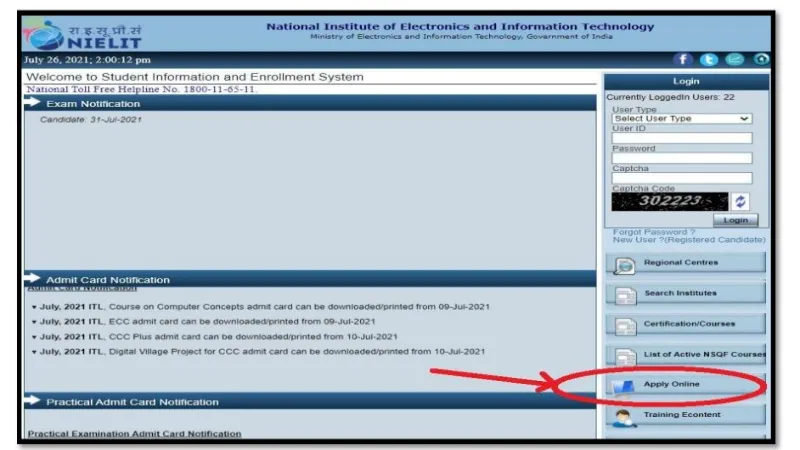
student.nielit.gov.in par “Apply Online” Click Karo
Website open karo → right panel mein “Apply Online” click karo → “IT Literacy Programme” section mein “Course on Computer Concepts (CCC)” select karo.
Declaration Accept Karo
Declaration form ka checkbox tick karo aur “I Agree & Proceed” button click karo. Bina ye kiye aage nahi badh sakte.
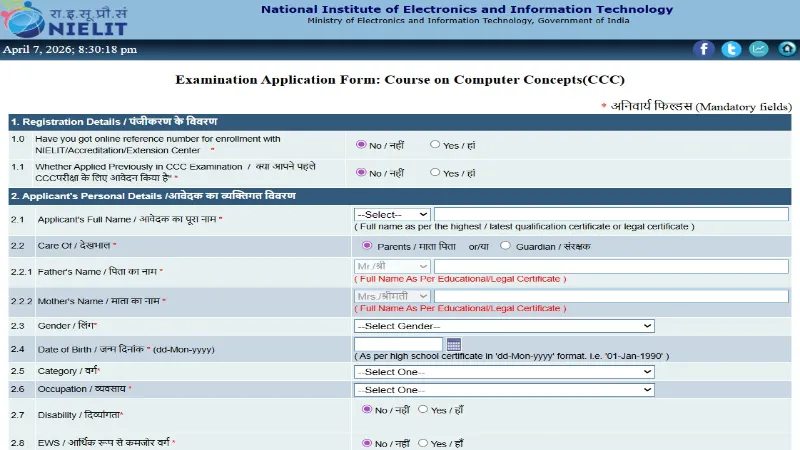
OEAF Form Bharo – 8 Parts
Form mein 8 parts hain — har part mein specific details bharna hai:
Part 1: Previous candidature details (pehle exam diya hai ya nahi) Part 2: Personal Details — Full Name*, Father’s Name*, Mother’s Name*, Gender*, DOB*, Category*, Occupation*, Disability* Part 3: Contact Details — Mobile Number*, Email ID* (personal, institute ka nahi) Part 4: Address — Address Lines*, City*, State*, District*, Pin Code* Part 5: Education Details Part 6: Exam Details — Type: “Direct” select karo*, Exam Month*, 2 Examination Centre choices* Part 7: Identification — Aadhaar Number, Apaar ID, Upload Photo*, Upload Signature*, Upload LTI Part 8: Declaration checkbox tick karo aur “Submit” click karoPreview Check Karo
Submit ke baad OEAF ka preview dikhega — Application Number, sabhi details, photo, signature sab ek screen par. Dhyan se check karo — galti hai toh “Back” button se correct karo. Sahi hai toh “Final Submit” click karo.
Exam Fee Pay Karo
Final Submit ke baad payment page aayega. Rs. 500 (+ GST/taxes) exam fee pay karo — 3 options hain: CSC SPV, NEFT/RTGS, ya Online (Net Banking/Debit Card/Credit Card/UPI). Details neeche payment section mein diye gaye hain.
Application Number Save Karo
Payment successful hone ke baad confirmation page dikhega aur SMS/email bhi aayega. Application Number note karo aur safe rakh lo — isi se admit card download hoga, result check hoga, aur certificate bhi isi se linked hai.
NIELIT ka Sabse Critical Rule — Yaad Rakho
NIELIT ka official rule hai: “No request for correction in Name, Mother’s Name, Father’s Name, Photograph, Signature, LTI, Date of Birth, etc. will be entertained at NIELIT, once the candidate has successfully submitted OEAF and fee.” Matlab — OEAF mein jo details bhari — wahi certificate par print hogi. Isliye form bharte waqt har detail 3 baar check karo. Galti ek baar hogi toh lifetime wahi certificate mein rahegi.
Photo, Signature & LTI Specifications (NIELIT Official)
CCC online form mein photo, signature, aur Left Thumb Impression (LTI) upload karna hota hai. NIELIT ki exact specifications neeche table mein diye gaye hain — ye official guide se verified hain. Galat specs ki file upload karne par form reject ho sakta hai.
| Spec | Photograph | Signature & LTI |
|---|---|---|
| Size (cm) | 3.5 W x 4.5 H | 4.5 W x 3.5 H |
| Pixels | 132 W x 170 H | 170 W x 132 H |
| File Size | 5 KB – 50 KB | 5 KB – 20 KB |
| DPI/PPI | 96 – 300 | 96 – 200 |
| Format | JPEG / JPG | JPEG / JPG |
| Rules | Professional photo, white background, no goggles, face clearly visible, last 6 months ki | White paper par black/blue ink se, clear aur smudge-free |
Photo Resize Kaise Karein?
Agar photo size badi hai toh free online tools use karo — “resize image to 50KB JPEG” Google karo. Photo studio se professional passport-size photo khichwa lo (Rs. 20-30) aur scan karwa lo. Mobile selfie upload mat karo — NIELIT clearly kehta hai “not on a mobile phone.”
CCC Exam Fee Payment – 3 Options (Verified)
CCC exam fee Rs. 500 (exclusive of taxes) hai. GST milake approximately Rs. 590 hota hai. Ye sirf exam + certification fee hai. Neeche NIELIT ke official guide se verified 3 payment options diye gaye hain:
| Payment Option | Kaise Karo? | Transaction Fee |
|---|---|---|
| Online Payment | Net Banking, Debit Card, Credit Card, UPI/BHIM | Rs. 5-18 (varies) |
| NEFT / RTGS | eChallan generate karo aur bank se NEFT/RTGS karo | Bank charges |
| CSC SPV | Form print karo aur nearest Common Service Centre jao | Rs. 20-30 |
Recommendation: Online payment (UPI ya Debit Card) sabse fast aur convenient hai — turant confirmation milta hai. CSC option un students ke liye hai jinke paas internet banking nahi hai.
Form Submit Ke Baad Kya Hota Hai? (Complete Timeline)
OEAF successfully submit hone ke baad aapki CCC journey ka timeline ye hota hai:
Turant: Confirmation SMS/Email aayega Application Number ke saath — ise save karo
Exam se 7-10 din pehle: Admit Card download available hoga student.nielit.gov.in par
Exam Day: Centre par jaao, admit card + photo ID le jaao, CAPES system par exam do
Exam ke 15-20 din baad: Result declare hoga — grade (S/A/B/C/D) dikhega
Result ke 30-40 din baad: Certificate download available hoga certificate.nielit.gov.in par
CCC Registration – Common Mistakes & How to Avoid Them
| Common Mistake | Kya Hoga / Solution |
|---|---|
| Name spelling galat bhari | Certificate par galat naam print hoga — correction Rs. 50 DD + 1 saal ke andar request. Prevention: Aadhaar/Marksheet se exact spelling copy karo. |
| Mobile selfie upload ki | NIELIT reject kar sakta hai. Prevention: Studio photo khichwa lo, white background, professional quality. |
| Photo size 50KB se zyada | Upload error aayega. Prevention: Online JPEG compressor se 50KB ke neeche resize karo. |
| Institute ka email/mobile diya | Notifications aapko nahi milenge. Prevention: Personal email aur mobile hi use karo. |
| Multiple OEAF submit kiye | Sirf last wala OEAF valid hoga. Pehle waale ki fee refund nahi hogi. Ek se zyada baar exam diya toh candidature cancel. |
| Application Number save nahi kiya | Admit card download nahi kar paoge. Prevention: Turant phone mein note karo + email mein search karo “NIELIT”. |
CCC Chapter Wise Practice Tests
Registration ho gayi? Ab taiyari shuru karo — har chapter ka test do
Important Disclaimer
CCCWale.com NIELIT se affiliated ya authorized nahi hai. CCC registration dates, form availability, aur exam schedule jaise time-sensitive updates ke liye hamesha NIELIT ki official website check karein:
→ student.nielit.gov.in (Registration, Admit Card, Result) NIELIT Helpline: 1800-11-65-11 (Toll Free) | Email: ccc@nielit.gov.in