
✓ VERIFIED Last verified: Jul 2026 | By: Sourabh Soni (CPCT Qualified)
Key Takeaways – CCC Certificate Download 2026
- Official Portal: certificate.nielit.gov.in
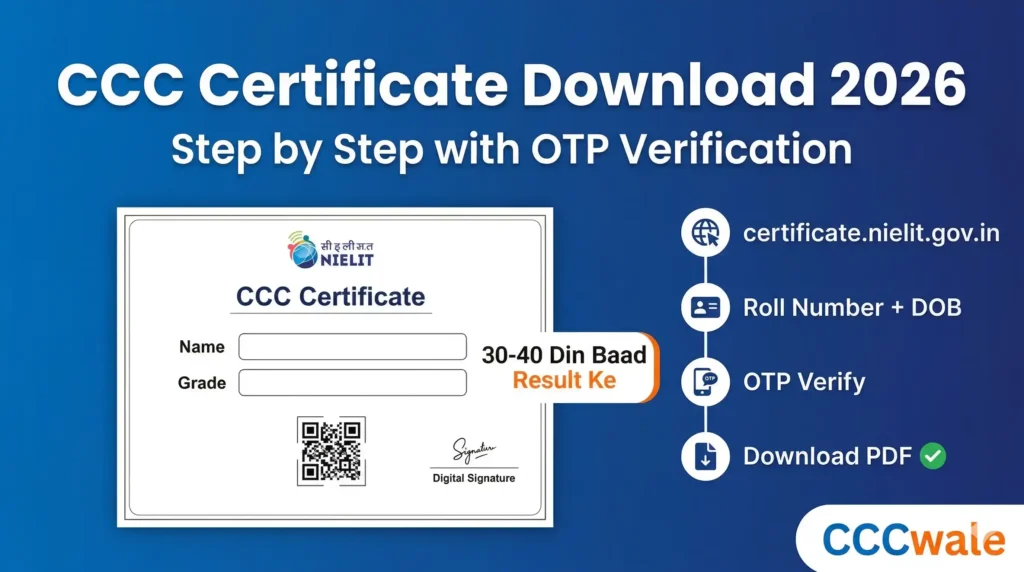
- Zaroori details: Roll Number + DOB + Exam Month/Year + Mobile Number (OTP ke liye)
- OTP Verification: Mandatory hai — koi bhi mobile number use kar sakte ho
- Certificate Format: Digitally Signed PDF — Adobe Reader se kholein
- Available: Result declare hone ke 30-40 din baad
- Validity: Lifetime — kabhi expire nahi hota
- Download Fee: Bilkul free — koi charge nahi
- Name se download: Nahi ho sakta — Roll Number mandatory hai
Is Article Mein Kya-Kya Hai (Table of Contents)
- CCC Certificate Download Kaise Kare – Step by Step (Verified)
- Official Portal – certificate.nielit.gov.in Details
- Roll Number Bhool Gaye? Kya Karein?
- CCC Certificate Digital Signature Validate Kaise Karein
- CCC Certificate DigiLocker Se Kaise Download Karein
- CCC Certificate Verification – Employer Kaise Check Kare
- CCC Result vs Certificate – Kya Fark Hai?
- Common Problems & Solutions
- CCC Certificate Validity – Lifetime Valid Hai
- CCC Certificate Ke Fayde – Government Jobs
- CCC Chapter Wise Practice Tests
- Frequently Asked Questions (FAQ)
CCC Certificate Download Kaise Kare – Step by Step
CCC certificate download karne ka process verified hai — neeche diye gaye steps directly NIELIT ke official portal certificate.nielit.gov.in se verify kiye gaye hain. Pura process 3-5 minute mein complete ho jaata hai. Aapko Roll Number, Date of Birth, Exam Month/Year, aur ek mobile number (OTP ke liye) chahiye.
Shuru Karne Se Pehle Ye Ready Rakhein
✅ Apna CCC Roll Number (Admit Card par likha hota hai) ✅ Date of Birth (DD-MM-YYYY format mein — wahi jo registration mein bhari thi) ✅ Exam Year aur Month (kis saal aur kis mahine mein exam diya tha) ✅ Koi bhi active mobile number (OTP receive karne ke liye — registered number zaroori nahi) ✅ Adobe Reader installed hona chahiye (digital signature validate karne ke liye)
CCC Certificate Download – Complete Steps
Official Portal Open Karo
Browser mein certificate.nielit.gov.in open karo. Ye NIELIT ka official certificate portal hai — koi aur website use mat karo.
“Regular Certificate” Select Karo
Page par “Select type of Certificate” mein do options hain — Regular Certificate aur Modular Certificate. CCC ke liye “Regular Certificate” radio button select karo (ye by default selected bhi hota hai).
Form Details Fill Karo
Neeche diye gaye 4 fields carefully fill karo: • Course For → Dropdown se “CCC” select karo • Year → Jis saal exam diya tha wo year select karo (jaise 2025, 2026) • Month → Jis month mein exam diya tha wo select karo (jaise January, March) • Roll_No. → Apna CCC Roll Number enter karo (admit card par likha hota hai)
DOB aur Captcha Enter Karo
• Student DOB → Date of Birth DD-MM-YYYY format mein enter karo (jaise 15-08-2000) • Captcha Code → Screen par dikhi Captcha Image mein jo text hai wahi type karo. Case-sensitive hai — Capital aur Small letters dhyan se dekhein. Agar clear na dikhe toh “Refresh” button dabo.
SUBMIT Button Click Karo
Sab details check karne ke baad “SUBMIT” button par click karo. Agar koi field galat hai toh error message aayega — dobara check karke correct karo.
OTP Verification — Ye Step Bahut Important Hai!
Submit ke baad ek “Verify Code via Email OR SMS” section dikhega: • E-Mail ya Mobile mein se ek option choose karo (Mobile recommend hai — faster hota hai) • Apna 10-digit mobile number enter karo — koi bhi active number chalega, registered number zaroori nahi • “Send SMS” button dabao • Ek popup aayega — OK karo • Mobile par OTP (One Time Password) aayega — use enter karo • SUBMIT button dobara click karo
Certificate Details Screen Par Dikhenge
OTP verify hone ke baad aapki CCC certificate details screen par aa jaayengi — Name, Photo, Roll Number, Grade, Exam Month/Year sab dikhai dega.
“Download Certificate” Button Click Karo
Page ke neeche “Download Certificate” button hoga — click karo. Certificate Digitally Signed PDF format mein download ho jaayega. Ise Adobe Reader mein open karo aur digital signature validate karo (neeche process diya gaya hai). Print karke laminate karwa lo — ye aapka official NIELIT CCC certificate hai.
CCC Certificate Download – Official Portal Details
| Detail | Information |
|---|---|
| Certificate Portal | certificate.nielit.gov.in |
| Verification Portal | certificate.nielit.gov.in/Verified/ |
| Result Portal (alag hai) | student.nielit.gov.in |
| Certificate Type | Regular Certificate (CCC ke liye) |
| Required Fields | Course (CCC) + Year + Month + Roll No. + DOB + Captcha + OTP |
| OTP Verification | Mandatory — Email ya Mobile par OTP aata hai |
| Mobile Number Rule | Koi bhi active number chalega — registered hona zaroori nahi |
| Certificate Format | Digitally Signed PDF (Adobe Reader se kholein) |
| Available After | Result ke 30-40 din baad |
| Download Fee | Free — koi charge nahi |
| Certificate Validity | Lifetime — kabhi expire nahi hota |
| Download by Name? | Nahi — Roll Number mandatory hai, sirf name se download nahi hota |
Fake Websites Se Bachein
Internet par kai fake websites hain jo “CCC certificate download” ka naam lekar personal details collect karti hain. Sirf official portal certificate.nielit.gov.in use karein. NIELIT certificate download ke liye kabhi koi fee nahi lagti — agar koi website paise maang rahi hai toh wo fake hai.
CCCWALE SMART BOOK
S Grade Ke Saath Apna Agla NIELIT Exam Bhi Pass Karo
Har chapter ke end mein QR code jo seedha test se jodta hai, chapter-wise aur full-length test series, aur last-week revision ke liye Smart Guide.
CCC Smart Book Kharidein →Roll Number Bhool Gaye? Kya Karein?
CCC certificate download karne ke liye Roll Number mandatory hai — bina roll number ke certificate download nahi ho sakta. NIELIT portal par “search by name” jaisa koi option nahi hai. Lekin agar aapka roll number kho gaya hai toh panic mat karo — neeche solutions diye gaye hain:
✅ Admit Card Download Karo — Roll number aapke CCC admit card par likha hota hai. Agar admit card hai toh wahan se roll number le lo. Agar admit card bhi nahi hai toh student.nielit.gov.in par apne Application Number se admit card dobara download karo.
✅ Application Number Check Karo — Jab aapne CCC exam ke liye online apply kiya tha tab ek Application Number mila tha. Ye number aapke email mein bhi hoga (NIELIT se confirmation email aaya tha). Application number se admit card download hoga, aur admit card par roll number likha hoga.
✅ NIELIT Helpdesk Se Contact Karo — Agar application number bhi nahi mil raha toh NIELIT helpdesk ko email karo: ccc@nielit.gov.in. Subject line mein “Roll Number Request — CCC” likho aur apna naam, DOB, exam month/year, aur photo ID bhejo.
Future Ke Liye Tip
CCC exam ke baad admit card, roll number, aur application number ko screenshot lekar phone mein save kar lo aur email mein bhi ek copy bhej do. Bahut se students certificate download ke time roll number nahi dhundh paate — ye simple step bahut time bachata hai.
CCC Certificate Digital Signature Validate Kaise Karein
CCC certificate ek digitally signed PDF hai. Jab aap ise pehli baar Adobe Reader mein open karoge toh signature ke jagah ek question mark (?) sign dikhega — iska matlab hai ki digital signature abhi validate nahi hua hai. Bina signature validate kiye certificate fully valid nahi mana jaata. Neeche step-by-step process diya gaya hai:
Digital Signature Validate Karne Ke Steps (Adobe Reader)
1️⃣ Certificate PDF ko Adobe Acrobat Reader mein open karo (browser mein mat kholna)
2️⃣ Signature par jo question mark (?) dikhai de raha hai — us par Right Click karo
3️⃣ “Validate Signature” option choose karo
4️⃣ Phir “Signature Properties” par click karo → “Show Certificate” karo
5️⃣ “Trust” tab par jaao → “Add to Trusted Certificates” par click karo
6️⃣ Ab Adobe Reader mein Edit → Preferences → Trust Manager jaao
7️⃣ “Update Now” button click karo (Adobe Approved Trusted Certificates section mein)
8️⃣ Wapas certificate par jaao aur “Validate Signature” dobara click karo
9️⃣ Ab question mark ki jagah green checkmark ✅ dikhega — signature validated!
Adobe Reader Zaroori Hai
NIELIT ki official website par bhi clearly likha hai — “Use Adobe Reader to download the Certificate”. Chrome ya Edge browser ka built-in PDF viewer digital signature properly validate nahi kar sakta. Isliye Adobe Acrobat Reader (free version) zaroor install karke rakhein. Ye acrobat.adobe.com se free download hota hai.
CCC Certificate DigiLocker Se Kaise Download Karein
NIELIT ka CCC certificate DigiLocker par bhi available hai. DigiLocker bharat sarkar ka official digital document storage platform hai — isme stored documents IT Act 2000 ke under legally valid hain aur original ke barabar maane jaate hain.
1️⃣ DigiLocker app ya website (digilocker.gov.in) open karo aur Aadhaar se login karo
2️⃣ “Search Documents” mein “NIELIT” search karo
3️⃣ NIELIT select karo → “CCC Certificate” choose karo
4️⃣ Apna Roll Number enter karo
5️⃣ Certificate fetch hokar permanently aapke DigiLocker mein save ho jaayega
DigiLocker ka faayda — government job applications mein directly DigiLocker se document link share kar sakte ho, print ki zaroorat nahi padti. Bahut se government forms ab DigiLocker se auto-fetch karne ka option dete hain.
CCC Chapter Wise Practice Tests
Certificate milne se pehle exam pass karna hai — har chapter ki alag practice karein
CCC Certificate Verification – Employer Kaise Check Kare
Agar aap employer hain ya kisi government department mein CCC certificate submit ho raha hai, toh NIELIT ne ek dedicated certificate verification portal banaya hai. Yahan Sl. No. (Serial Number) ya Roll Number enter karke certificate ki authenticity check ki ja sakti hai.
1️⃣ certificate.nielit.gov.in/Verified/ open karo
2️⃣ Serial Number (Sl.No.) ya Roll Number enter karo — dono mein se koi ek
3️⃣ Captcha code enter karo aur Submit karo
4️⃣ Certificate details — Name, Photo, Grade, Exam Month — screen par dikh jaayengi
CCC Result vs Certificate – Kya Fark Hai?
Bahut se students “CCC marksheet download” search karte hain — lekin CCC mein marksheet nahi milti, sirf certificate milta hai. Result aur Certificate alag cheezein hain:
| Aspect | CCC Result | CCC Certificate |
|---|---|---|
| Kya dikhta hai? | Sirf Grade (S/A/B/C/D/F) | Name, Photo, Grade, QR Code, Digital Signature |
| Kab milta hai? | Exam ke 15-20 din baad | Result ke 30-40 din baad |
| Portal | student.nielit.gov.in | certificate.nielit.gov.in |
| Govt job ke liye? | Sirf provisional proof | Final official document — ye submit hota hai |
CCC result check karne ka detailed process alag guide mein diya gaya hai: CCC Result 2026 – Kaise Check Karein →
Common Problems & Solutions – CCC Certificate Download
CCC certificate download karte waqt kuch common problems aa sakti hain. Neeche har problem ka solution diya gaya hai:
| Problem | Solution |
|---|---|
| OTP nahi aa raha | 2-3 minute wait karo. Na aaye toh doosra mobile number try karo. Network issue bhi ho sakta hai — WiFi par try karo. |
| Captcha galat bata raha hai | Captcha case-sensitive hai — Capital aur Small letters dhyan se dekhein. “Refresh” button dabakar naya captcha lao. |
| “Record not found” error | Roll Number, Year, Month, ya DOB galat ho sakti hai. Admit card se verify karo. DOB format DD-MM-YYYY hai, MM-DD-YYYY nahi. |
| Certificate abhi available nahi hai | Result ke baad 30-40 din wait karo. NIELIT DLC exams (CCC sameet) ab quarterly cycle mein hote hain, isliye certificates bhi quarterly schedule ke hisaab se release hote hain, monthly nahi. |
| PDF mein signature par ? mark dikha raha hai | Ye normal hai — Adobe Reader mein open karke digital signature validate karo (upar steps diye gaye hain). |
| Website kaam nahi kar rahi / slow hai | NIELIT ki website par kabhi-kabhi heavy traffic hota hai. Thodi der baad try karo ya off-peak hours mein (subah 6-8 AM ya raat 10 PM ke baad). |
CCC Certificate Validity – Lifetime Valid Hai
CCC certificate lifetime valid hai — ye kabhi expire nahi hota. Agar aapne 2019 mein CCC pass kiya tha toh wo certificate 2026 mein bhi valid hai aur aage 2030, 2040 mein bhi rahega. NIELIT ne koi expiry date set nahi ki hai.
Ek aur important baat — agar aapke certificate par “DOEACC Society” likha hai (purane certificates par hota tha) toh wo bhi fully valid hai. DOEACC ka naam change hokar NIELIT hua hai — organization same hai, sirf naam badla hai. Dobara exam dene ki zaroorat nahi.
CCC Certificate Ke Fayde – Government Jobs Mein Value
CCC certificate sirf ek paper nahi — ye kahi state-level government jobs mein mandatory requirement hai:
🏛️ UPSSSC Lekhpal, VDO, Gram Panchayat Adhikari — UP government posts mein CCC mandatory
🏛️ Rajasthan LDC, Patwari, Police — Computer certificate (CCC equivalent) zaroori
🏛️ Court Clerk, DEO (Data Entry Operator) — CCC certificate eligibility mein listed
💼 Private Sector — Data entry, office admin, front desk positions mein computer literacy proof
CCC course ki complete jaankari — fees, syllabus, duration, registration, exam pattern: CCC Course 2026 – Poori Jaankari →
CCC Ke Saath Typing Bhi Seekh Lo
Lekhpal, VDO, Patwari, Stenographer — in sabhi government jobs mein CCC ke saath typing speed test bhi hota hai. Ye time waste mat karo.
CCCWALE SMART BOOK
CCC+ Ya ECC Ki Taiyari Kar Rahe Ho? Quarterly Cycle Mein Ek Mauka Mat Gawao
Ab DLC exams saal mein sirf 4 baar hote hain — ek mistake ka matlab 3 mahine ka wait — CCC Smart Book mein poore syllabus ke topic-wise notes, har chapter ke end mein QR code jo seedha test se jodta hai, chapter-wise aur full-length test series, aur last-week revision ke liye Smart Guide — sab ek bundle mein.
Abhi CCC Exam Ki Taiyari Shuru Karein
5,500+ Questions | 280+ Tests | Hindi + English | Instant Results